Programmatically resetting the <af:query> and search result table
If you want to programmatically reset QueryModel of <af:query> component, you can use the following code snippet in your managed bean.
Along with the above requirement, If you need to reset the contents of result table as well, then call executeEmptyRowSet() on the ViewObject which is wired to the result table.
Download
I'm attaching simple application illustrating the above discussed points. You can download the sample workspace from here.
[Runs with Oracle JDeveloper 11g R1 PS3 + HR Schema]
A glance at the implementation
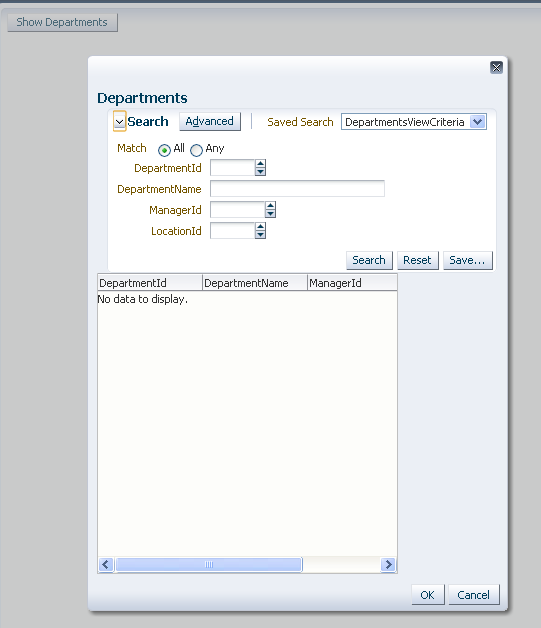
This example displays a popup with a search panel and result table. The custom popupFetchListener method added for the af:popup component resets the search panel and result table contents before displaying the popup.

Learn More ...
There are a lot more points like this. If you are curious to learn the internals of the ADF Business Components and ADF Binding Layer, the following book is for you - Oracle ADF Real World Developer’s Guide.
More details about this book can be found in this post- http://jobinesh.blogspot.in/2012/07/pre-order-your-copy-of-oracle-adf-real.html
     RichQuery queryComp = getRichQuery();
     QueryModel queryModel = queryComp.getModel();
     QueryDescriptor queryDescriptor = queryComp.getValue();
     queryModel.reset(queryDescriptor);
     queryComp.refresh(FacesContext.getCurrentInstance());
Along with the above requirement, If you need to reset the contents of result table as well, then call executeEmptyRowSet() on the ViewObject which is wired to the result table.
Download
I'm attaching simple application illustrating the above discussed points. You can download the sample workspace from here.
[Runs with Oracle JDeveloper 11g R1 PS3 + HR Schema]
A glance at the implementation
This example displays a popup with a search panel and result table. The custom popupFetchListener method added for the af:popup component resets the search panel and result table contents before displaying the popup.
Learn More ...
There are a lot more points like this. If you are curious to learn the internals of the ADF Business Components and ADF Binding Layer, the following book is for you - Oracle ADF Real World Developer’s Guide.
More details about this book can be found in this post- http://jobinesh.blogspot.in/2012/07/pre-order-your-copy-of-oracle-adf-real.html
As always thanks for share with us your examples !!
ReplyDeletewhat if i used execute with param and how to reset the table
ReplyDeleteWell, if the question is how to clear the table, then you can use VO::executeEmptyRowSet(). Does not matter how you did execute the method from UI.
ReplyDeletewhere to I apply VO::executeEmptyRowSet() because of I used execute with param
ReplyDeleteThanks
Hi,
ReplyDeleteI have a query panel, with two attributes (First Name & Last Name). I want to set certain values for these bind variables in the query panel, and when the popup comes up, I want the query panel to show the right values with the table also showing the right results.
I set the values in the view criteria, and the table is showing the right results, but the query panel shows the value from the previous invocation.
First Invocation (Invoked for John Doe)
First Name - Empty
Last Name - Empty
Table Shows results for First Name-John and Last Name - Doe
Second Invocation (Invoked for Steve Smith)
First Name - John
Last Name - Doe
Table Shows results for First Name-Steve and Last Name - Smith
Any pointers?
-Arvind
Arvind
ReplyDeleteTry setting intialQueryOverridden=true for search binding and execute VC from the popupFetchListener
Is there any way to reset the filtered results on the table when click on the reset button.
ReplyDeleteAfter reset results table should display all available table not filtered results
Is this possible??
Hi Jobinesh,
ReplyDeleteI would like to reset the viewcriteria with view results, but by default all the records should display once reset. Please advice. if i use execute query to view object, it will fetch record from db, so all my updated changes in the table will get reverted. Please sugggest some solution.
Hi,
ReplyDeleteI have used QuickQuery with table in the popup.I have two attributes in the search,once i done search on second attribute and click the cancel button.then after i opened the popup,still it is pointing to second attribute.please answer this issue
Hi ,
ReplyDeleteI have table with in the fragment . I dragged and dropeed as a region into jspx page . When i try to fetch the UI component " qryId1 " from the jspx page as pt1:region:0:qryId1 (findRichQueryInView(" pt1:region:0:qryId1"); ). Its throwing me null error .
Can you suggest how to get ride of this issue.
I mean with in the region
ReplyDeletesorry for some reason af query is not getting displayed with in the comment
ReplyDelete